 AitJaz
How to get an API key for speech to text in AitJaz
The quickest free option is a Google Gemini key: you create it in Google AI Studio in a few steps, and audio input on the free tier costs nothing. Groq also has a free plan with the Whisper model. OpenAI, xAI (Grok), OpenRouter, Together AI and Mistral keys work in AitJaz too, but speech recognition there is paid or not confirmed as free. We checked each service's official pages on 20 November 2026. You don't need a key to start: AitJaz recognizes speech on your computer offline by default, or online with your own API key if you add one.
What is an API key, and why would AitJaz need one?
An API key is a long string that a cloud service gives you, a bit like a password. The service uses it to know who sent a request and to count your usage. When you paste a key into AitJaz, the app sends the audio of your speech straight to that service, on your behalf, and gets text back.
AitJaz is a voice typing app for Windows 10 and 11: hold a key, speak, and the text appears with punctuation wherever your cursor is, in any app. It also turns audio and video files into Word documents or subtitles. It doesn't require a key: out of the box it recognizes speech on your PC, without internet, in 18 languages. A cloud service is worth adding if your computer is slow, or if you want higher accuracy in a particular language and you are fine with the audio going to the service you picked. You pay that service directly, at its rates. AitJaz takes no part in that payment.
AitJaz itself is a one-time purchase: $20 for 2 PCs, with a free 7-day trial and a 14-day refund. No subscription, so with a free Gemini or Groq key there's no monthly bill at all.
Once you switch the cloud on, three things go to the service:
- the audio of your dictated phrases, or of the recording you open in “Audio & video to text”;
- the speech language you chose;
- the words from your Vocabulary, so the service spells them your way.
Text already written in the window is not sent. The key is stored on your computer in encrypted form, and the AitJaz team never receives it. If the internet drops or the service doesn't answer during dictation, the phrase is recognized on your computer as usual. More in the privacy policy.
Which API keys work for speech to text in AitJaz?
AitJaz accepts keys from seven services. For most of them it recognizes the service from the first characters of the key, so you don't have to pick anything. Here is what the official pages said on 20.11.2026:
| Service | Key starts with | Free speech recognition |
|---|---|---|
| Google Gemini | AQ. (older keys: AIza) | Yes, on the free tier |
| Groq | gsk_ | Yes, on the free plan, within its limits |
| OpenAI | sk- | No, billed at OpenAI's rates |
| xAI (Grok) | xai- | No free tier on its official pages |
| OpenRouter | sk-or- | No: AitJaz uses a paid transcription model there |
| Together AI | tgp_ | No: a first purchase of credits is required |
| Mistral | no fixed prefix | Not confirmed on its official pages |
Anthropic (Claude) keys are not supported: AitJaz shows that it recognized the key, but says speech recognition through that service isn't available.
How to get a free Gemini API key, step by step
Google Gemini is the easiest place to start. Audio input is free of charge on the free tier of the Flash-Lite model AitJaz uses, and we have tested a Gemini key in AitJaz ourselves. Google requires you to be 18 or older.
- Open the keys page. Go to aistudio.google.com/apikey and sign in with your Google account.
- Accept the terms. On your first visit, AI Studio asks you to accept its Terms of Service.
- Create the key. For new users, AI Studio creates a default project and an API key on its own right after you accept the terms. If the list is empty, click “Create API key”.
- Copy the key. Keep it somewhere private, like a password manager.
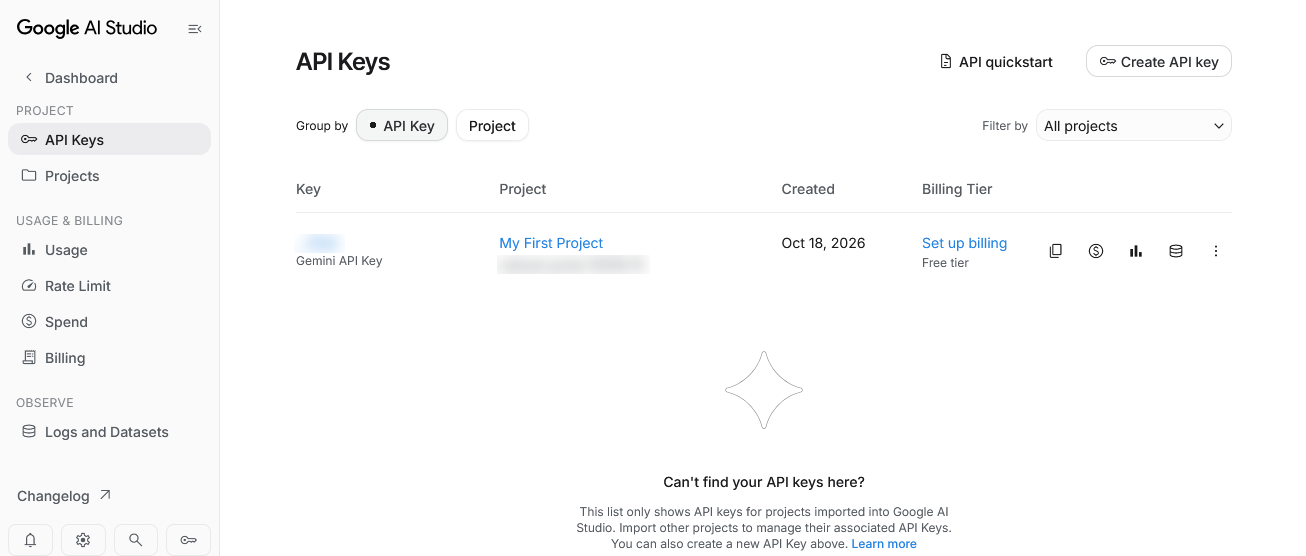
Our key was created on the free tier without a billing account: the page showed “Free tier” next to a “Set up billing” link. Google doesn't publish fixed free-tier numbers on its general pages; your current limits are shown inside AI Studio.
What Google does with free-tier audio
Under the Gemini API terms, content sent through the free (unpaid) tier is used to improve Google products, and human reviewers may read and annotate it. Google itself asks you not to send sensitive, confidential or personal information through the free tier. On the paid tier, your requests are not used to improve Google products.
💡 A free Gemini key suits text you wouldn't mind a stranger reading: posts, notes, drafts. For client letters, contracts, medical details or other people's personal data, switch back to “On this computer, offline” in the “Cloud recognition” section, or untick dictation there. Then the audio never leaves your PC.
Where the Gemini API is available
Google keeps an official list of supported regions. On 20.11.2026 it included the United States, the United Kingdom, Canada, Australia, India, Germany, France, Spain and Kazakhstan, among many others. Russia was not on it. If your country isn't listed, AitJaz still works as usual, recognizing speech on your computer.
Where to paste the key in AitJaz
Don't have AitJaz yet? Download it: it's free for 7 days, no account or card.
- Open Settings. Click the AitJaz icon next to the clock and choose “Settings”.
- Go to “Cloud service”. It's the teal section with the caption “Your own API key”.
- Pick the mode. In “Cloud recognition”, select “Cloud service — your own key”. After installation it is set to “On this computer, offline”.
- Paste the key into the “API key” field. AitJaz recognizes the service from the key and shows, for example, “✓ Google Gemini key”. A Mistral key has no recognizable prefix, so a “Service” list appears, and you choose Mistral there.
- Click “Check”. If everything is fine, you'll see “✓ The key works.”
- Choose what the cloud is for. Next to “Use for:”, tick dictation, “Audio & video to text”, or both.
- Click “Save”.
From now on, when you hold the dictation key, the badge under “AitJaz is listening…” reads “Cloud · Google Gemini”. Next to the key field there is a “Where to get a key” link that opens the key page of the selected service.
The second free option: a Groq API key
Groq has a free plan, and speech recognition there runs on Whisper (the whisper-large-v3-turbo model). By default Groq doesn't retain your inference requests. It may keep logs for up to 30 days when troubleshooting errors or investigating abuse, and in “Data Controls” you can turn on Zero Data Retention.
- Open console.groq.com/keys and sign in or create an account.
- Create a new API key and copy it. Groq keys start with gsk_.
- Paste it into AitJaz the same way as a Gemini key and click “Check”. AitJaz recognizes Groq on its own.
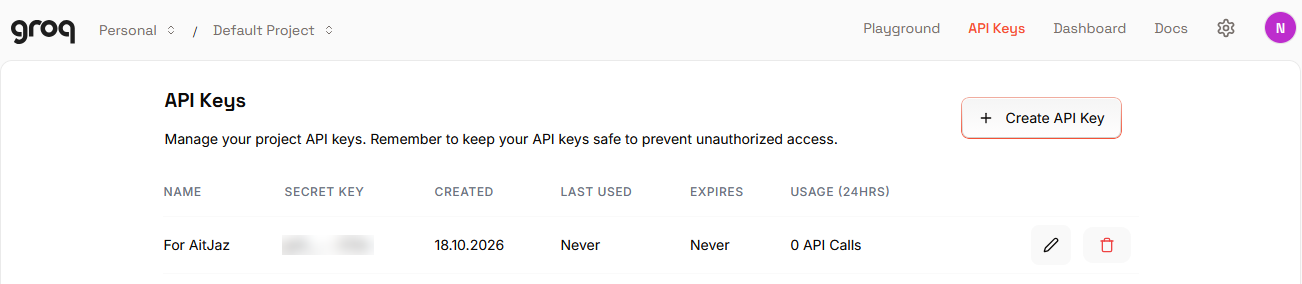
Groq counts speech limits in seconds of audio, per hour and per day. Each request is billed as at least 10 seconds, so short dictated phrases use up the limit faster than you might expect. Your exact limits are on the limits page of the Groq console. In our test, dictation worked fine on a free Groq key, while a long recording in “Audio & video to text” didn't fit into its limit in one go.
How to get an OpenAI API key for transcription
If you searched for a “ChatGPT API key”, this is it: OpenAI issues keys for apps in its developer dashboard. Transcription through the API is paid, so add billing to your account first.
- Open platform.openai.com/api-keys and sign in.
- Create a new secret key, give it a name and copy it straight away.
- Paste it into AitJaz and click “Check”. Keys starting with sk- are recognized as OpenAI.
OpenAI states that data sent to its API is not used to train its models unless you explicitly opt in. We have tested an OpenAI key in AitJaz ourselves.
How to connect an xAI (Grok) API key
Since version 0.3.17 (16 November 2026), AitJaz also works with xAI. It sends your audio to xAI's own speech-to-text endpoint with the grok-voice-transcribe-2.0 model.
- Open the xAI console at console.x.ai, sign in and go to the API keys page of your team.
- Create a key and copy it. xAI keys start with xai-.
- Paste it into AitJaz. The app shows “✓ xAI key” by itself; click “Check” and save.
xAI's speech-to-text page doesn't list prices or free credits, so check the current rates in the xAI console before you rely on it. According to xAI's security FAQ, it never trains on your API inputs or outputs without your explicit permission, and stored data is deleted after 30 days. For Kazakh, Uzbek and Kyrgyz, AitJaz lets the service detect the language itself; xAI's page doesn't say whether these languages are supported. We connected xAI following its documentation and haven't yet tested it with a live key.
OpenRouter, Together AI and Mistral
- OpenRouter. It has free models, but AitJaz recognizes speech there through a paid transcription model. A key with no credits on the account won't work for AitJaz, and the phrase will be recognized on your computer. Keys are at openrouter.ai/settings/keys.
- Together AI. There is no free trial: you need a first purchase of at least $15 in credits before you can create API keys.
- Mistral. You create a key in the Studio console under API Keys, and Mistral shows the full key only once. Its docs say you need a plan with API access. We couldn't confirm on Mistral's official pages that speech recognition is free.
Prices change, so check them on each service's own site before you top up an account.
What happens when the free limit runs out or the account is empty?
When you dictate, AitJaz briefly retries and then recognizes the phrase on your computer. The “Done” badge says why, for example “On this computer: cloud limit”. You still get your text.
When you transcribe a file in “Audio & video to text”, since version 0.3.17 AitJaz first tries to keep the job in the cloud:
- If the service asks you to wait a short while, AitJaz pauses with a countdown (“Waiting N s, then continuing in the cloud…”) and carries on in the cloud.
- If the wait is longer, there are no funds on the account, the key is rejected or the service is unreachable, AitJaz asks under the progress bar: “Continue transcribing on this computer?” You answer “Yes, on this computer” or “No, wait for the cloud” (for a rejected key or an empty account, the second option is “No, stop”).
- If you don't answer within 10 minutes, the rest of the recording is transcribed on your computer.
How to keep your API key safe
The service counts requests against your key, and on a paid plan it also charges money for them. Treat the key like a password:
- don't post it in chats, on social media or in screenshots;
- don't send it to anyone. AitJaz never asks you for your key, so ignore any email or message “from support” that does;
- if you no longer need the key in AitJaz, click “Delete key” in the “Cloud recognition” section and save;
- if the key may have leaked, delete it in the service's dashboard and create a new one.
FAQ
Is there really a free API key for speech to text?
Yes, as of 20.11.2026: Google Gemini's free tier doesn't charge for audio input on the model AitJaz uses, and Groq has a free plan with Whisper. Both have limits, and free tiers do change, so look at the service's terms before you rely on the cloud. AitJaz itself recognizes speech on your computer with no key at all.
Do I need a credit card to get a Gemini or Groq key?
Our Gemini key was created on the free tier without a billing account, and Groq didn't ask us for a card when we created a free-plan key in October 2026. OpenAI, Together AI and OpenRouter need paid credits before AitJaz can transcribe through them.
Which key gives the best accuracy?
It depends on your language, microphone and voice, so the fair test is your own speech. Paste a key, dictate a few paragraphs you usually write, and compare with the offline mode on the same text.
Is it safe to paste my API key into AitJaz?
The key is stored on your computer in encrypted form, and the AitJaz team doesn't receive it. Audio goes only to the service whose key you pasted. You can remove the key at any time with “Delete key”.
Can I use the cloud only for audio files and keep dictation offline?
Yes. In “Use for:”, tick only “Audio & video to text”. Dictation then stays on your computer, and only the recordings you open in that section go to the cloud.
Do I need the cloud at all?
No. By default AitJaz works offline, on your computer, in 18 languages. The cloud is an option for a slow PC or for higher accuracy in a particular language.
When this was checked, and sources
We checked the services' terms against their official pages on 20 November 2026. Gemini, OpenAI and Groq keys have been tested in AitJaz with real accounts; xAI, OpenRouter, Together AI and Mistral are connected according to their documentation. We update this article when the services change their terms.
- Google: pricing and free tier, Gemini API terms, available regions, creating a key.
- Groq: rate limits, speech to text, your data.
- OpenAI: your data in the API.
- xAI: speech to text, security FAQ.
- OpenRouter: limits.
- Together AI: billing and credits.
- Mistral: creating a key.
To try it on your own speech, download AitJaz (free for 7 days, no card), paste the key under “Cloud service” and dictate a paragraph you'd normally type. If you skip the key, it works offline.
If you want to dictate without any cloud, start with offline dictation software for Windows. Transcribing meetings and interviews is covered in audio to text with speakers.
One familiar tool instead of many
Every app does things its own way: a different button here, different settings there, and every time you have to remember how to turn it on and how to use it. AitJaz works one way everywhere: hold Right Ctrl, speak, let go, and the text appears where your cursor is. It's the same in messengers, email, documents, your browser and AI chats, so you only learn it once.